
 by
by 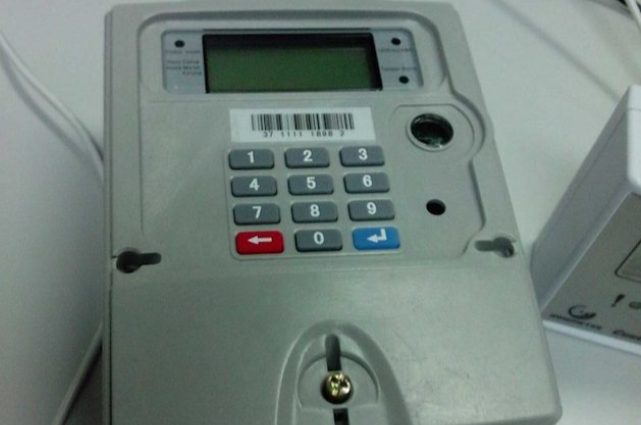
Have you ever been using electricity comfortably, only for your prepaid meter to suddenly cut off without warning? No blinking alert, no long notice — just darkness. That moment usually comes with one painful realization: you had no idea your units were almost finished. That’s exactly why knowing how to check prepaid meter balance is not just helpful, but essential for every household in Nigeria.
Whether you live alone, manage a family apartment, or run a small business, regularly checking your prepaid meter balance helps you stay in control and avoid unnecessary surprises.
The good news is this: checking your prepaid meter balance is not complicated, and you don’t need to be a technician to do it. Depending on your meter type, you can check your balance using simple meter codes, directly on the meter screen, on your phone, or even online in some cases.
In this guide, you’ll effectively learn how to check prepaid meter balance in Nigeria. Don’t worry! We have explained everything clearly and practically. No confusing technical terms, no guesswork — just straightforward steps that actually work.
So what are you waiting for? Grab your seat and relax as we guide you through the process!
Also Check: Different Types of Houses in Nigeria with Names + Pictures
Why You Should Regularly Check Your Prepaid Meter Balance
After getting your prepaid meter and learning how to recharge it, the next thing is to learn how to check the prepaid meter balance.
This is because regularly checking your prepaid meter balance helps you stay ahead of unexpected power interruptions. Many people only think about their meter when the light suddenly goes off, but by then, the damage is already done — especially if you’re working, cooking, or running a business.
When you make it a habit to check your balance, you can easily tell how many units are left and plan your electricity usage better. This is particularly important in Nigeria, where electricity supply can be unpredictable, and topping up at the last minute is not always convenient.
Another reason to check your prepaid meter balance often is to monitor unusual power consumption. If you notice that your units are finishing faster than normal, it may indicate faulty appliances, power leakage, or excessive energy use. Early detection helps you adjust before your electricity costs rise unnecessarily.
Checking your prepaid meter balance also helps with household budgeting. Knowing your remaining units allows you to plan when to reduce usage, especially during periods of high consumption, such as festive seasons or extreme weather conditions.
Most importantly, once you understand how to check prepaid meter balance, you no longer depend on guesswork. You stay informed, in control, and prepared — without stress or sudden darkness.
Also Check: Certificate of Land Ownership in Nigeria: Meaning, Process, and How to Get Yours Legally
Types of Prepaid Meters in Nigeria
Before learning how to check prepaid meter balance, it’s important to understand the types of prepaid meters in Nigeria, and also know which type you have. This is because the method for checking your balance can vary slightly depending on the meter model and interface.
In Nigeria, prepaid meters generally fall into two major categories.
Keypad Prepaid Meters (CIU-Based Meters)
This is the most common type of prepaid meter used in Nigerian homes.
With this type, you have a separate device called a Customer Interface Unit (CIU). The CIU comes with:
- A keypad (number buttons)
- A small display screen
- Sometimes a beeping alert when units are low
The CIU is usually mounted inside the house, while the main meter box may be outside or placed far from reach. Most households interact only with the CIU.
If you use a keypad prepaid meter, you typically check your prepaid meter balance by:
- Entering specific meter codes, or
- Pressing certain buttons to scroll through balance information
This type of meter is user-friendly and widely supported across different electricity distribution companies in Nigeria.
Continue reading as we are going to explain everything in detail!
Smart / Digital Prepaid Meters (Non-Keypad or Integrated Meters)
Some newer buildings and estates use smart or digital prepaid meters. These meters may not have a full keypad like the CIU-based ones.
Instead, they may feature:
- A single button or touch-sensitive area
- An LCD screen that cycles through information
- Limited manual input options
For smart prepaid meters, checking your balance often involves:
- Pressing the meter button repeatedly to view remaining units, or
- Using supported phone or online platforms (where available)
Because these meters differ by manufacturer, the balance display method may not be exactly the same for everyone.
Why Knowing Your Meter Type Matters
Understanding your prepaid meter type helps you:
- Avoid using the wrong meter code
- Prevent error messages
- Quickly locate your balance information
- Follow the correct steps without frustration
Once you’ve identified your meter type, checking your balance becomes much easier and more reliable.
Also Check: 6 Proven Ways to Make Cool Money from Real Estate With Zero Capital
How to Check Prepaid Meter Balance in Nigeria
The first thing to note when talking about how to check prepaid meter balance in Nigeria is that it’s not a one-size-fits-all process. The exact method depends on your meter type, meter model, and sometimes the platform supported by your electricity distribution company. However, the goal is always the same: to know how many electricity units (kWh) you have left before they run out.
The good thing is that Nigerian prepaid meters are designed to make balance checking simple once you understand the right approach. Whether you use a keypad meter, a smart digital meter, or a mobile-based option, there is always a way to access your balance without stress.
Below are the most reliable and commonly used ways to check prepaid meter balance in Nigeria. You do not need technical skills — just follow the method that applies to your situation.
The Main Ways to Check Prepaid Meter Balance
In Nigeria, prepaid meter balance can be checked through the following broad methods:
- Using prepaid meter keypad or screen buttons
- Using your phone (USSD or mobile platforms)
- Using meter balance codes
Each of these methods works differently, and some meters support more than one option. That’s why understanding your meter type earlier is important. It helps you choose the correct method without trial and error.
Without wasting much time, let’s break down each method in detail for a better understanding!
Also Check: 5 Signs the Land You’re Buying Might Be in an Unlawful Location
How to Check Prepaid Meter Balance Using Prepaid Meter Keypad or Screen Buttons
One of the simplest and most reliable ways to check prepaid meter balance in Nigeria is by using the meter keypad or the screen buttons. This method works for most homes, especially those using CIU-based prepaid meters or smart meters with a display screen.
If your prepaid meter has a keypad or a button directly attached to it, you don’t need the internet, USSD codes, or any external platform. Everything you need is already on the meter device.
Steps to Check Balance Using the Keypad or Buttons
Although the exact steps may differ slightly depending on the meter model, the general process is usually the same:
- Locate your prepaid meter display unit
This could be the Customer Interface Unit (CIU) inside your house or the meter screen itself. - Press the “Enter” or “OK” button (if available)
Some meters require you to press a confirmation button before information appears. - Scroll through the display using the arrow or number buttons
Keep pressing until you see a screen showing your remaining units. - Check the unit balance displayed
Your balance is usually shown in kilowatt-hours (kWh). This tells you exactly how much electricity you still have.
On some smart meters, pressing a single button repeatedly cycles through different information, such as meter number, tariff, and remaining units. When you see the unit value, that is your prepaid meter balance.
Why This Method Is Reliable
Checking prepaid meter balance using the keypad or screen buttons is reliable because:
- It works even without internet
- It does not depend on external platforms
- It gives real-time balance information
- It’s supported by most prepaid meters in Nigeria
If your meter responds properly when buttons are pressed, this method should always be your first option.
Also Check: 10 Simple Rules for Peaceful Living With a Roommate
How to Check Prepaid Meter Balance on My Phone
With the increasing use of smartphones in Nigeria, learning how to check prepaid meter balance directly on your phone is useful as it has become a convenient option for many households. This method is especially useful for people who may not have easy access to their meter or prefer a remote balance check.
There are generally two ways to check prepaid meter balance on your phone:
1. Using USSD Codes
Some electricity distribution companies in Nigeria allow you to check your prepaid meter balance using USSD codes. USSD (Unstructured Supplementary Service Data) is a quick way to send commands from your phone without internet access.
Steps to check using USSD codes:
- Open your phone’s dialer.
- Enter the USSD code provided by your electricity company (for example, some distributors use
*582*MeterNumber#— confirm with your local Disco). - Press the call/send button.
- Wait a few seconds, and your meter balance should display as a text message on your phone.
Tip: USSD codes may differ depending on your electricity distribution company, so it’s best to confirm with your local Disco or check their official website.
2. Using Mobile Apps
Some Discos in Nigeria provide official mobile apps that allow you to check your prepaid meter balance, recharge your meter, and monitor usage history. Popular apps may include features such as:
- Instant display of remaining units
- Alerts for low balance
- Recharge history tracking
- Notifications for unusual consumption
How to use a mobile app:
- Download the official app from Google Play Store or App Store.
- Register your meter number and account details.
- Open the app and select “Check Balance” or similar option.
- Your remaining units will display instantly on your phone.
Using an app is convenient for people who want a detailed overview of electricity usage, beyond just checking balance.
Why Checking Balance on Your Phone Is Useful
- You can check your balance anytime, anywhere, without needing to be near the meter.
- Mobile checks often provide additional information, like recharge history or alerts.
- It’s ideal for households managing multiple meters or businesses with multiple units.
Also Check: The Best Negotiation Tips for Getting a Lower Property Price
How to Use Code to Check Prepaid Meter Balance
Using meter codes is one of the most popular ways to check prepaid meter balance in Nigeria, especially for households using keypad-based prepaid meters. These codes are short numeric combinations entered directly on the meter keypad to display specific information, including your remaining electricity units.
It’s important to note that prepaid meter codes are not universal. The exact code that works for your meter depends on the meter manufacturer and sometimes your electricity distribution company. However, the process of using the code is generally the same across all meters.
General Steps to Check Prepaid Meter Balance Using a Code
Follow these simple steps to check your prepaid meter balance using a meter code:
- Go to your prepaid meter keypad or CIU
Make sure the display screen is on and readable. - Enter the balance-check code carefully
Use the keypad to type the correct code for your meter. - Press the “Enter” or “OK” button
This confirms the command and prompts the meter to display your balance. - Wait for the balance to appear on the screen
Your remaining units will usually be shown in kWh.
If the code is correct and supported by your meter, your prepaid meter balance should display immediately.
What Happens If the Code Does Not Work?
If you enter a code and nothing happens or an error message appears, don’t panic. This can happen for several reasons:
- The code is not supported by your meter model
- The code was entered incorrectly
- The meter requires a different command format
In such cases, you can try:
- Re-entering the code slowly and correctly
- Checking your meter manual (if available)
- Using the keypad or button method instead
Why Meter Codes Are Widely Used
Many people prefer meter codes because:
- They are quick and direct
- No internet or phone is required
- They work even during unstable network conditions
- They provide instant balance information
Once you know the correct code for your meter, checking your prepaid meter balance becomes a fast daily habit.
In the next section, we’ll look at common prepaid meter balance codes used in Nigeria and explain what they do.
Also Check: Safe Locations to Build a Home Away From Flood Zones in Nigeria
Prepaid Meter Codes
Prepaid meter codes are numeric combinations that allow you to check your balance, know the total imported energy, or access many other meter functions directly from your meter keypad. While the exact short codes may vary depending on your meter type and electricity distribution company, some codes are widely used and recognized across most meters in Nigeria.
Below is a helpful guide to the common prepaid meter codes and what they do.
Common Prepaid Meter Codes in Nigeria
| Code | Function / Purpose |
|---|---|
004 | Total Import active energy |
009 | Balance Credit |
036 | Total import active energy used in the last 24h |
037 | Total import active energy used in the last 30 days |
448 | Current month total import active energy |
Note: The exact code can differ depending on your meter manufacturer (e.g., Itron, Secure, EDMI, Landis+Gyr). If one code doesn’t work, refer to your meter’s instruction manual or contact your electricity distribution company.
Tips for Using Prepaid Meter Codes
- Enter codes carefully – A single wrong digit can result in an error.
- Check for confirmation – Press the “Enter” or “OK” button after entering the code.
- Observe the screen – Your balance or requested info should display instantly.
- Avoid guessing codes – Using random codes can lock some meters temporarily.
Why Knowing Prepaid Meter Codes Is Useful
- They provide instant access to your remaining electricity units.
- They allow you to monitor your usage without needing the internet or phone apps.
- They help you troubleshoot meter errors by accessing meter info directly.
Learning the codes for your specific meter makes checking your prepaid meter balance a quick, reliable, and stress-free task.
Also Check: How to Know If a Property Listing Is Legit in Nigeria
Frequently Asked Questions About How to Check Prepaid Meter Balance
How to Check Prepaid Meter Balance Online?
As of the time of writing this article, checking prepaid meter balance online is uncommon, as many electricity distribution companies in Nigeria do not provide web portals where you can view your meter information, including remaining units. The most effective ways of checking prepaid meter balance include using the prepaid meter keypad or screen buttons, using your phone (USSD or mobile platforms), and using meter balance codes, just as we discussed above.
How to Recharge Prepaid Meter?
To recharge your prepaid meter, click here and follow the steps in the article.
How to Check Prepaid Meter Balance: Final Thoughts
Knowing how to check prepaid meter balance in Nigeria puts you in control of your electricity usage. Instead of guessing or waiting for sudden power cuts, you can monitor your remaining units and plan ahead with confidence.
The most important takeaway is that checking your prepaid meter balance is not complicated. Whether you prefer using the meter keypad or screen buttons, meter balance codes, your phone, or online platforms, there is always a method that fits your situation. Once you understand the option that works best for your meter type, the process becomes quick and stress-free.
If you ever experience difficulties, remember that the issue is often not the meter itself but using the wrong method for your meter type. Start with the simplest option, and only move to advanced methods if needed.
With the steps shared in this guide, you now have everything you need to check your prepaid meter balance confidently and without stress.



Join The Discussion